

A full ERP & automation stack in 3 months for ~£38 per user per month
When pigs fly
“£38 per user per month for all our business systems, and all live in 12 weeks.”
Sounds like the kind of thing a salesperson says just before the pigs take off, right?
The “industry standard” story for a small business goes more like this:
- £130–£150+ per user per month in software licences
- 9–12 months of implementation
- A small army of consultants
- Endless firefighting while everything is “in transition”
We decided to prove it doesn’t have to be that way. We’re Bright Lambs, and if we can’t implement processes and tools efficiently and quickly for ourselves, we’ve got no right to advise anyone else. So we set ourselves a constraint:
Two Business Analysts | A full, integrated, automated software stack
Minimal software costs | Fully documented | All before Christmas 2025
No pigs. No magic. Just good business analysis, sensible tools, and a ruthless focus on value.
What we actually implemented in 3 months
This isn’t “we bought some licences and drew a slide”. These are live processes and systems we now use every day. We used our 5 step implementation process to deliver this solution efficiently and effectively. We relied heavily on ERPNext, which has a single platform fee rather than per user per month.
Hire to Retire
End-to-end people processes, from the first day to last.
- Onboarding process & formsStandardised onboarding process, role-specific checklists for HR, IT, line manager etc, single digital form for all employee information reducing burden to the new employee, with email reminders and tracking.JiraGoogle Formsn8n
- Training (mandatory & skills)Auto-enrolment to mandatory and role specific training, core training modules in Google Classroom, tracked completion with email remindersGoogle ClassroomNotebookLMGoogle FormsGoogle SheetsERPNext
- Leave application & approvalEmployees request leave, managers approve, google team calendars and records update automatically.ERPNextn8nGmailGoogle Calendar
- Overtime & TOIL approvalOvertime requests, manager approval and confirmation the overtime was completed then conversion to TOIL balances updated and traceable.ERPNextn8nGmail
- Jexi – our HR & policy AI botStaff can ask “What’s our TOIL policy?” or “How do I book parental leave?” and get consistent answers, linked back to the source policy documents.WindsurfSupabaseEmployee portal
Project Delivery
Project initiation process, setup and tracking, ensuring client work is visible, on-track, billable and manageable.
- Project deliveryProject setup and financials in ERPNext, detailed delivery in Jira. New customers and projects automatically linked between ERP and Jira, no double entryERPNextJira
- Timesheet reporting & approvalConsultants log time once in our employee portal; managers and clients review and approve; data flows through to billing and reporting.ERPNextEmployee portal
- Customer portalClients can see project status, service requests, key documents and invoices without emailing.Self-built front endERPNextXeroJira
Opportunity to Order
Simple, joined-up sales pipeline, not random spreadsheets and local contacts lists.
- Lead generationLight-touch lead capture through our website or employee portal, with AI helping us capture data and research leads.Web-contact formEmployee portalGemini GemsERPNext
- Lead → Opportunity managementA proper pipeline that links to delivery – so we don’t sell things we can’t deliver. Reviewed by account managers and project leadsERPNextJira
Order to Cash
Cashflow with as few manual steps as possible. No double entry, automatic sync. Tightly controlled user access from ERPNext standard functionality
- Sales ordersSales orders raised in ERPNext, synced to Xero as sales invoices These also appear on the client portal for finance and managers.ERPNextXero
- Invoice & paymentInvoices issued, payments reconciled in Xero, status visible back in ERPNext.XeroERPNext
Purchase to Pay
Control and transparency without drowning in approvals.
- Purchase order approvalStandard PO workflow with thresholds and approvals, automated notifications. Approved POs then pushed to Xero for payment.ERPNextn8n
- Receipt & invoice postingGoods receipt and supplier invoices logged in ERPNext, pushed to Xero.ERPNextXero
- 3-way match & paymentPO, receipt and invoice checked & matched; only then do we pay.ERPNextXero
Everything else that makes it work
- Process, user guides, FAQs, policiesReal documentation that people actually use, linked from the tools they work in.Google DocsConfluence
- Data lake & BI reportingOne place for reporting across finance, operations and people.SupabaseLooker Studio
- SecurityCentralised identity, device and access controls.Various security tools
- Employee portalOur own front end where employees can do the stuff they actually need – leave, timesheets, training, policies, portal links – without jumping between ten different systems.WindsurfRenderSupabasen8n
- WebsiteWindsurfRender
The stack: how we kept the cost down
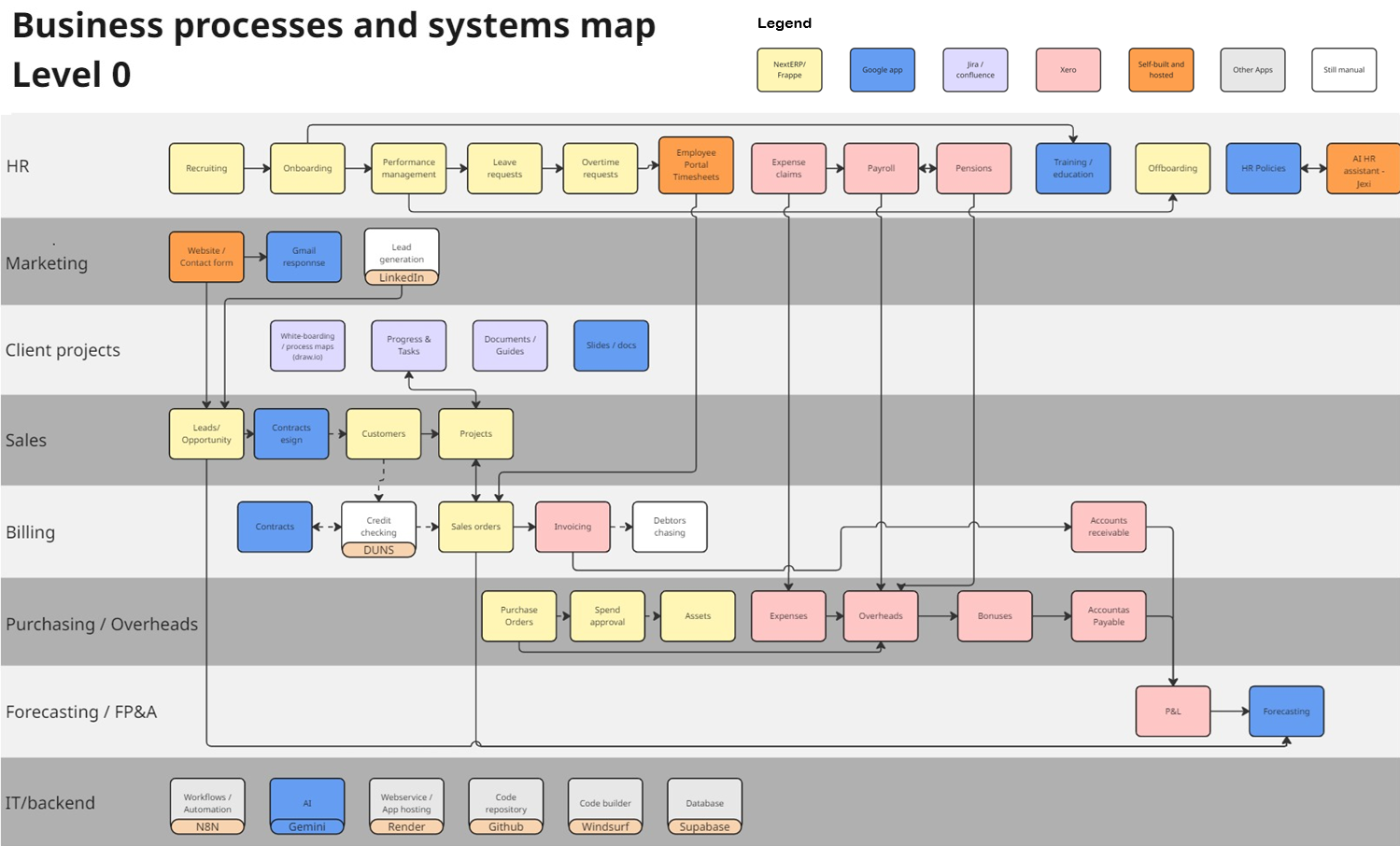
We didn’t buy one giant monolith. We used a mix of broad-utility apps, free tiers, and platform-style tools where we pay per environment, not per user.
Paid broad utility apps
- Google Workspace Business Standard
- Windsurf (AI dev env)
- Render (hosting)
- Supabase (data & auth)
Free (for small teams)
- Jira & Confluence
- Slack
Platform, not per user
- ERPNext (Full ERP)
- n8n (Automation)
So what does it actually cost?
For Bright Lambs right now: ~£38 per user per month (up to 9 users).
As we scale our costs rise, but as we get larger then our costs per user actually reduce due to the benefits of platform, not per user fees. There is an increase in cost due to data and compute, but its not a linear per user increase.
How?
- Leveraging free tiers
- Platform-based pricing
- Buying only what we use
Scaled Costs (Estimated)
- 20 users~£110 /user/month
- 50 users~£104 /user/month
"With the right architecture and good business analysis, you can get enterprise-grade capability for a fraction of the traditional cost."
Compare this to the industry standard £130–£150+ per user per month typically seen in SMEs.
How we did it so quickly
We started with processes, not tools
We mapped our level 0 processes first. Then chose the best value for money tooling that could support each.
We reused patterns
Once we had one good approval flow (say, leave applications), we reused the pattern for overtime, TOIL, POs, etc.
We automated ruthlessly
If someone had to do the same task more than twice, we asked “can we make n8n or inbuilt workflows do this instead?”
Heavy use of AI tools
If we had to create something we hadn’t done before we used AI to learn and develop. For example integrating ERPNext and Xero.
Do you want this for your business?
If you’re spending £130+ per user on a stack nobody fully uses, or stitching together spreadsheets because systems don’t talk to each other... we should talk.